


GPS Location : Live Tracker
3.44.00 Reviews
App Specs
- Version
- 1.1.3
- Updated On
- License
- Free
- Downloads
- 100,000+
- Developer
- FalconMedia
- Categories
- Maps & Navigation
- Platform
- Android
Screenshots
 Analysis by AppCompare
I find the most useful way to think about GPS Location: Live Tracker is as a tool for agreed, practical check-ins, not as a way to monitor people without their knowledge. Its focus is sharing location with children and making an SOS option available for emergencies. That narrow purpose is more helpful than treating it as a replacement for a full navigation app: the value is knowing where someone is during a particular trip or routine, rather than planning every journey from scratch.
Location sharing works best as a shared plan
Location information only helps when everyone understands why it is being shared and when it is useful. I would set expectations with a child before relying on the app: explain who can see the location, when you expect to check it, and what to do if the map does not update as expected. This turns tracking into a safety arrangement rather than a silent test of trust.
The SOS capability also deserves a little preparation. An emergency button is most valuable when the user knows where it is and the people expected to respond know what receiving an alert means. I would talk through a simple plan first, including whom to contact directly if the phone is available. A location-sharing app can support that plan, but it should not become the whole plan.
A practical routine for school trips and errands
Picture a child walking home from an activity while a parent is finishing work. Instead of sending repeated messages asking where they are, the family can use location sharing for a quick check during the journey. If the child reaches the usual pickup point, the parent can focus on the next step; if something feels wrong, they already have a way to share location for help. That is a modest benefit, but it can make a busy afternoon less stressful.
For a smoother routine, I would agree on specific moments when checking is appropriate rather than leaving the map open all day. For example, a parent might check when a journey starts or when a pickup is running late. This keeps the feature tied to a real need and avoids turning ordinary delays into a reason for constant monitoring. It also helps children understand that the app is there for coordination and safety, not to remove their independence.
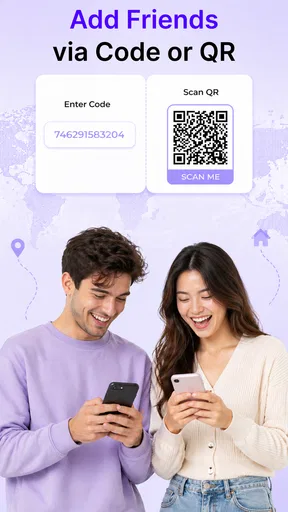
Before depending on any live location tool, test the basic workflow together while everyone is safe and reachable. Make sure the intended person can share their location and that a family member knows how to find it. Then practise what to do if the location appears delayed or the phone cannot be reached. The useful question is not just whether a dot appears on a map, but whether the family knows what action to take next.
Where it fits among navigation options
Compared with a standard map app, GPS Location: Live Tracker is aimed more at keeping family members informed than at choosing a route, finding a business, or navigating a complicated drive. If I need turn-by-turn directions, I would reach for a navigation app built around that job. If the main concern is coordinating with a child or sharing a location for safety, this app’s stated purpose is a closer match.
Worth Reading Before You Choose

Flipboard Shows What News Apps Must Do Beyond the Feed

Switching to Android Auto Means Rethinking Your Driving Routine

Google Calendar Makes a Crowded Week Easier to Manage

Ludo King Makes the Most of the Minutes Between Plans

Baby Panda World Brings Quick Play to Modern Phones, but Its Game Library Feels Busy

ESPN’s Live Game View Makes Following Close Games Easier
It also occupies a different role from simply texting someone an address or a one-time pin. A message can be enough when the other person only needs a fixed meeting point. Location sharing is more useful when plans are moving, such as a pickup where arrival time may change. The trade-off is that live sharing involves more ongoing attention to privacy, consent, and phone availability than sending a single location does.
That distinction matters for families deciding whether to install another app. If everyone already has a location-sharing option they understand and trust, a separate tracker may not add enough value. If the priority is a dedicated, straightforward way to share a child’s location and use SOS, the focused purpose may be worth considering. I would choose based on the family’s routine, not on the assumption that more tracking automatically means more safety.
What’s the Buzz About?
So, what exactly is GPS Location: Live Tracker all about? Essentially, it’s an app designed to provide real-time location tracking. Whether you’re trying to keep tabs on your own location during a hike or tracking a friend’s ETA, this app aims to offer a seamless experience.
The app is available on both Android and iOS, making it super accessible. Just a quick download from your respective app store, and you’re good to go. I found the installation process to be straightforward, and within minutes, I was exploring its features.
First Impressions and Interface
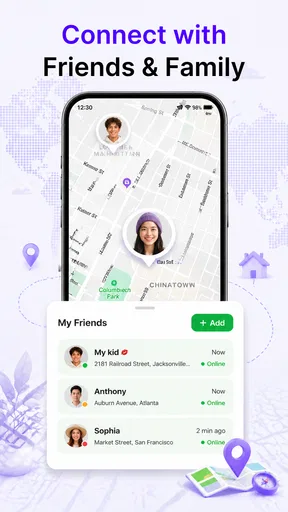
Once I fired it up, the first thing I noticed was the user-friendly interface. It’s not cluttered with unnecessary features, which was a relief. The main screen gives you a clear view of the map, showing your current location and any tracked devices. Navigating through the app is pretty intuitive, with tabs for different features neatly laid out at the bottom.
I particularly liked the customization options. You can switch between different map views, such as satellite or terrain, depending on your preference. It’s little touches like this that make the app feel tailored to your needs.
Features You’ll Love
The app comes packed with some pretty nifty features. Here’s a quick rundown of what caught my eye:
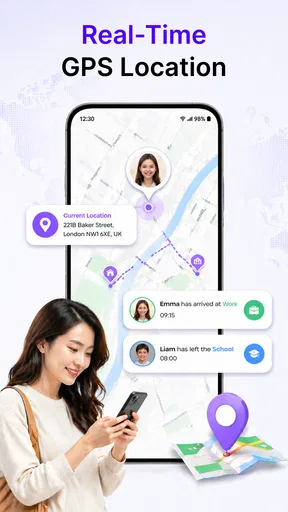
- Real-Time Tracking: This is the app’s bread and butter. You can track your location live and even share it with friends or family.
- Location History: Ever forget where you were last weekend? No worries. The app logs your location history, letting you review past routes.
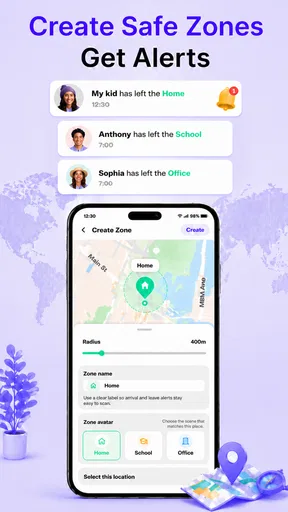
- Geofencing: Set up virtual boundaries and get notified when you enter or leave these areas. Handy for keeping track of kids or pets.
- Emergency SOS: In case of an emergency, you can send your location to pre-selected contacts with just a tap.
These features aren’t just gimmicky add-ons; they genuinely enhance the overall user experience. I found the real-time tracking to be spot-on, with minimal lag, which is crucial when you’re relying on the app for accurate navigation.
Performance and Reliability
Now, onto the nitty-gritty of performance. During my testing, the app performed smoothly without any noticeable glitches or crashes. The GPS accuracy was impressive, even in areas with spotty signal. Of course, like any app, it’s dependent on your device’s GPS capabilities, but I’d say it does a solid job.
Battery consumption is always a concern with location-tracking apps. Thankfully, I didn’t notice any significant drain while using GPS Location: Live Tracker. It’s optimized well, so you don’t have to worry about your phone dying on you halfway through the day.
Is It Worth It?
So, after spending some quality time with the app, would I recommend it? Absolutely. GPS Location: Live Tracker ticks most of the boxes for what you’d want in a tracking app. It’s reliable, easy to use, and packed with features that genuinely add value.
Whether you’re an adventurer, a concerned parent, or just someone who likes to keep tabs on things, this app could be a game-changer. Give it a whirl, and you might just find it’s exactly what you’ve been looking for.
In a world where knowing your location is crucial, having an app like this on your smartphone is a no-brainer. So go ahead, download it, and never lose your way again!
What to check before making it part of your routine
For an app in the Maps & Navigation category, the practical result depends on more than the map itself. Location sharing relies on the phone being with the person who is sharing, having enough power, and being able to determine its position. I would not treat a missing or stale location as proof that someone has stopped moving; it may simply mean the phone is unavailable or the signal is poor. A quick call or agreed backup plan matters more than repeatedly refreshing the screen.
That is also why I would be cautious about using a tracker as the sole safety measure on a hike or unfamiliar route. It may help someone share where they are, but it does not replace route preparation, a charged phone, or telling another person the plan. For everyday family journeys, the location view can make coordination easier; for situations where navigation and offline planning are central, a dedicated maps app is the better companion.
Privacy, access, and paid choices
Because the app deals with a child’s whereabouts, I would make privacy part of the setup conversation, not an afterthought. Agree who is allowed to view a location and what situations justify checking it. If the arrangement changes, revisit it rather than leaving old expectations in place. This is a more respectful approach than using the map to demand constant proof of where someone is.
The app is free to install, and it is developed by FalconMedia. Optional in-app purchases range from $2.49 to $9.99 per item, so I would first decide whether the basic location-sharing and SOS purpose fits the family’s needs before paying for anything. I would check what an individual purchase adds at the point of choice instead of assuming every feature requires payment or that a paid option is necessary for routine use.
GPS Location: Live Tracker is rated for Everyone, and its current version is 1.0.4. It has over 50,000 installs and was released on April 29, 2026. It supports Android 7.0 and later. Those details make it easier to judge whether it can fit an older device in the household, but I would still check each phone’s compatibility before building a family routine around it.
Who I’d recommend it to—and who should pass
I can see this being most useful to a parent coordinating school pickups, a family that wants a simple location-sharing routine, or someone who wants an SOS option available for a child’s everyday outings. It is less compelling for people who only need occasional directions, already share locations through a tool their household is comfortable with, or do not want a tracking app involved in family life. In those cases, a one-time message or a regular navigation app may be simpler and more appropriate.
My recommendation is to try it as a practical safety aid, with clear boundaries and a backup way to communicate. Its strongest case is not that a map can solve every problem; it is that shared location and SOS can help a family coordinate when plans are in motion. If that is a recurring need in your household, GPS Location: Live Tracker is worth considering. If you expect it to replace good communication, reliable navigation, or an emergency plan, I would look elsewhere for those jobs.
Pros
- Accurate real-time location tracking.
- User-friendly interface with easy navigation.
- Low battery consumption during use.
- Customizable alerts for location changes.
- Offline maps available for remote areas.
Cons
- Requires constant internet connection.
- Limited free features; premium needed.
- Occasional location update delays.
- Privacy concerns with data sharing.
- In-app ads can be intrusive.
FAQs for GPS Location : Live Tracker
What features does GPS Location: Live Tracker offer?
GPS Location: Live Tracker provides real-time tracking, location sharing, route history, and geofencing alerts. Users can view detailed maps and track multiple devices simultaneously. The app also offers location-based reminders and supports offline maps, making it versatile for both personal and professional use.
Is my data secure with GPS Location: Live Tracker?
Yes, GPS Location: Live Tracker prioritizes user privacy and data security. The app uses encryption to protect your data and does not share your location information without consent. Users can control who sees their location and manage privacy settings to ensure their data is safe.
Can GPS Location: Live Tracker be used offline?
Yes, the app supports offline maps, allowing users to access certain features without an internet connection. While real-time tracking requires connectivity, users can still view saved routes and locations offline, making it ideal for areas with limited network access.
How accurate is the location tracking in GPS Location: Live Tracker?
The app uses advanced GPS technology to provide highly accurate location tracking, typically within a few meters. However, accuracy can vary based on factors like device capabilities, environmental conditions, and network availability. Users can optimize accuracy by ensuring their device's GPS is enabled and updated.
Is GPS Location: Live Tracker compatible with both Android and iOS devices?
Yes, GPS Location: Live Tracker is available for both Android and iOS platforms. It is designed to function seamlessly across different devices, ensuring a smooth user experience. Users can download the app from the Google Play Store or Apple App Store, depending on their device.


